Bob Stewart
asked me to be a part of the Active
Rain experiment along with 4 others to try out the Flip
Video camera and the hosting service that the videos will
be hosted on. We were not supposed to tell anyone about the name of the
on line hosting server but we were supposed to tell about our
experiences. Well, someone let the cat out of the bag so I can go ahead
and talk about it all now.
When
Bob asked me to do this I told him that learning about how to use video
on line was one of my goals for this year so this was really perfect
timing. Nothing like just doing it right now, right?
I use a Sony camcorder
right now, a very nice, top of the line camera for all my
listing photos and family photos. It is a still camera and a video
camera with a mini DVD that you put the video on. I tape videos of my
kids and all that family stuff and just keep the DVDs. My first attempt
to video a happy client video turned into a very frustrating ordeal and
I finally had to just put it aside to learn another day.
So
when Bob told me how easy it was to use the camera and software I was
all ears. I was so excited when I received my camera and then my
hosting password and such to get started.
Today I filmed my first video and was very excited to share it
with Active Rain and give rave reviews.
Well, things don't always happen the way you envision. I saw Jessica's
video today, I saw Sarah
Cooper' s video, I have not seen Bill
Gassett's video and of course I saw Brad
Andersohn's videos using this camera and software. Well,
Brad' s don't count because I did not expect to do as good as his.
And maybe Jessica's should not count either, she probably
cheated, after all she is blonde too and how could she do it and I
can't!
After trying to get the
camera to work for about 4 tries, my 5 year old son had to show me how
to get it to record! How bad is that! I wasn't going to
even post about my experience, I wanted to hide in a cave somewhere!
How embarrassing! I am the
only one out of the 5 people who can't get this thing to work!

Then I remembered Bob
wanted to know all about it. He wanted to hear the truth of the
experience and so I decided to share my experience!
Well,
my first experiment was a TOTAL FAILURE!
The Flip camera is very
light and cute. It has barely any buttons and it comes
with a cloth case that you can carry around with you. You are supposed
to be able to just take it out and shoot and that is it. Well, I read
the directions and of course the directions come on a tiny piece of
paper that NO baby
boomer can read without our glasses. The marketers of these cameras
tout off about how user friendly they are and I am sure that they are
for all the young whipper snappers out there in Cyberspace. But the fact
of the matter is that most real estate agents are over the age of 40!
They need to supply us with magnifying glasses to use along with our
glasses to read the directions.
So I get through the
directions and then I go to film. I am supposed to just
press the red button and it will record. NOT!
I pressed the read button
and the camera still says ready. Well, my son showed me
that I needed to press the red button close to the top of the red
button and then it records. There are only a few symbols on the camera
and you have to read sign language to be able to understand it all. I
guess that is so that people all over the world can use this camera.

What I do really like
about the camera is that it runs on double A batteries,
easy to find, not expensive to replace and you don't have to put it on
a charger or plug it into a USB port on your computer to
charge it up. That is very convenient. It also stores 30 minutes of
video. That is easier for people to understand than disk
space or memory card space.
The other thing that I
really like about the camera is that the USB plug is
tucked inside the camera and you just press it and it pops right out
and then you attach it to your computer USB port.
So I did all of that and
then I log in to Mixpo. I liked how easy it was to set up
our profile. But then after that I am totally lost. It looks too easy
and there are no instructions as to what to do.
I click on made a video
ad, start from scratch and then I load my video.
After it loads Mixpo asks
me to choose one of the scenes to use as like the cover
shot of the video and ALL THE SCREENS ARE BLACK! I tried to
figure this out for over 2 hours! I just wanted to throw the
camera out of the window! I finally clicked on one of the black screens
just to see what it would do. I get the file loaded and I can
hear the entire video but there is no VIDEO!
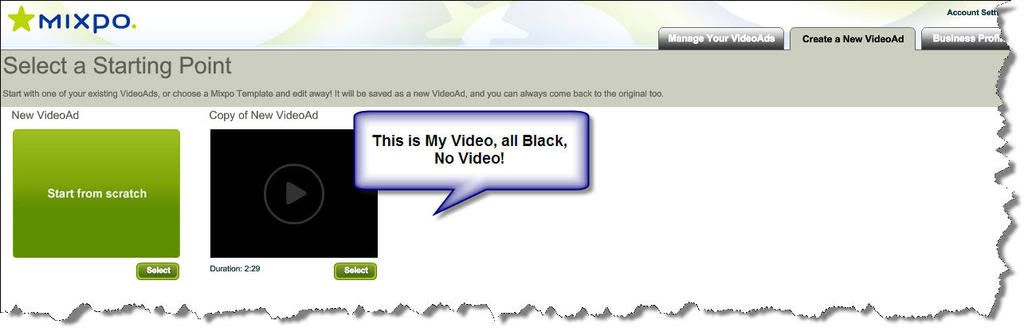
I
thought this was a video , not a podcast!!!!!
Well, maybe I am the only
blonde having this experience at this time. I am
not usually technically challenged. I can take a computer apart, change
hard drives, add network cards and graphic cards, I can trouble shoot a
lot of things. Then again, I can not stand Excell and will not even
attempt to frustrate myself to learn it. I can maneuver through Active
Rain seamlessly and can teach you a ton of stuff about SEO and getting
your blog up on the front page of Googleand I can write and read.
So
what is wrong with this video flop????????????????

I am intimidated just reading that! I am not near as computer savvy as you are and rely on my hubby as my Tech Support. I have so much to learn!!!
Fear not, you will get it even if it takes a little longer. It is amazing that our children can run computers and most electronic items better than we can!
Hi Katerina: I am sorry your video did not work out. These cameras can be pretty hard to figure out sometimes. But... as to the others... Sarah's video was great. You could tell she was a tad nervous, but just as she usually does, she put herself out there... just as she is... and it turned out great... and very much encouraged many, many others to give it a try. Brad's video was great, as his always are. Well thought out, and well presented.
Bills... well, I scrolled through the first two pages of his posts, and am guessing he has not been able to get to it. Jessica's was done with a Minnie Mouse voice to be funny, and could have put together a great video I am sure. I am sure her future videos will be great.
So... Katerina... not to worry. Keep on trying... it will come. You, too can be a movie star. What you might do is give Sarah Cooper a call and ask her to walk you through it. I am sure she will be glad to. Take care...
wow! I am still debating on whether or not to go and buy this new gadget. I went to Target and WalMart and they were both out of stock! I also tried to figure out Mixpo and I got totally lost!
Katerina - I am pretty disappointed that your video wasn't a snap. I was kinda waiting for a few of you to try it and give me come clues. I do have one teenager left - I will have her do it and teach me. I am sure you will try it again and "excell" at it. I will be back for my lesson!
I loved this post because I can identify with every sentence, phrase, and word. In fact, I get pretty weery of reading how "easy" everything techie is. My son (the one who nagged me into blogging) is now nagging me to get a web cam and make videos and... but I feel like I'm light years ahead of my peers with this tech stuff and I may be at my limit for absorption. haha. I know you'll be writing about this again, and you'll probably be joining the "it's easy" crowd - and then I'll be inspired to try.
Kudos to you for voicing your frustration - and going against the grain a little that it isn't easy for everyone. Hopefully someone that knows will help you. I have not tried a flip - the 60 minute was on sale at a local store last week but they were out - have a raincheck and waiting. I did do some editing with my camcorder, and I have to say it was long & tedious but came out nice. Now to try a house (I practiced on footage just on there already of my kids).
Libby- Yes, I was quite frustrated. I was not going to even write this post but then I remembered the instructions and Bob wanted all the cards on the table, so here it went!
Katerina: Very funny!! Small and cute is not always best, especially, for baby boomers. It seems as if you have put forth a very good effort to learn and use this camera. After about 2-3 hours, it would have been back in the mail to the sender if it had been me. You stated the truth about your experience as you promised... The camera may be a lemon...
Ouch! sorry to hear it did not work out well for you. I too use a Sony camcorder that records directly to DVD. I have found that extremely frustrating in the past. Apparently I bought the bottom of the line version, with no usb capabilities, and no software to boot! After several years of frustration and experimentation, I was kind of excited when I heard about the flip camera.
Karen- I did take it seriously! This is a serious thing for me because Bob is depending us to tell him about our experience. I never would have been part of the experiment if I thought it would be a joke. It is a software thing I just don't get! I am sure I will get with Brad on Monday and learn what to do. I was asked to give my unabashed experiences of using this camera and software, Bob asked for it, he got it!
John- You can get it at Amazon, that is where Bob got them from. They are very light and cute and seem too simple, well, maybe they are. But it is something I am not getting in the loading of the video!
Katerina - I can relate to you my friend. I am one of the most computer literate agents in my office of over 50 Realtors and there is some technology that just leaves me scratching my head! After all, we men are not supposed to have to read instructions! Some of this stuff just leaves me dizzy!
George- This just baffled me to tears! It looks so easy, what is it that I do not get, I wondered! Sound but no video? AND I did have the lens cover off, especially since this little gadget does not have a lens cover:) Bob wanted the unabashed version!
Virginia- It will turn out fine. If my 5 year old can do it, I am sure that Brad can walk me through this. It is not the camera it is the Mixpo and the loading of the video onto my computer that is the problem I have not been able to solve on my own.
Jessie and Kathy- Yeah, that makes me feel better! Bob is just messing around with me. He made sure I got the lemon so I could feel like a total ditz! :) He did it for the ratings, I am sure!
Nestor & Katerina, from everything I had read to this point I was thinking this may be an good and easy way to go. I can relate to your 5 year old being able to lend assistance, whenever I get new technology I always say "Now I just need to find a kid to show me how to use it". Honestly though that is the way I am with the techno stuff; I can read instructions until I'm blue in the face but if someone walks me through it I'm good to go. I'll be very interested to read more comments and posts on the Flip.
Bob- Sarah did a great job with hers. I am sure the problem will be solved on Monday! For me, it is the stupid small print that you can not even see. Just like my cell phone, I need my glasses on to make a call and to see who is calling me! I just saw some commercial for cell phones for baby boomers, with BIG numbers on them. But for me it is more the little tiny window they give you for caller ID and making calls. I have sound on mine so a voice tells me the numbers I am putting in the phone so I know I am going to dial the right number.
Margaret- Well, there were these teeny tiny instructions about 3 inches by 4 inches at the most, one teeny tiny side for English and Mixpo has NO instructions. Bob told me, all you have to do is plug it in and it just works, well, sorry! He must have it out for me or maybe this is some prank!
Steve- Thanks for making me feel better:) I think maybe the gods at AR are just out to get me!:) I will post the video as soon as I can figure out how to get the image onto the software! It is a learning curve. I am very proficient on the internet and with SEO and blogging and even hardware. But this video thing has always baffled me.I used to try to do the entire editing thing years ago when you had to hook up the camcorder to the computer and use very expensive software and then I could not do it either.
Lenn- I am pretty sure that Bob is pulling a prank on me in order to get better rankings just like the TV shows and the news media does!
I wouldn't put it past him to single me out like this:)
They did something to my camera!!!!!!
How come out of 5 people I am the only one that doesn't get it.
HMMMM, maybe I am the only baby boomer who can not read that teeny tiney print that is all but a few sentences of instructions.
I asked Bob, where are the instructions! He says, oh, it is so easy, you just plug it in and it loads it all by itself and it is user friendly! Hmmm, :)
I agree, Real Estate Shows is SO easy! Even I can do that!
Bill Somerset- I did have software with my camcorder sony, and I just love taking the still shots, the quality is fabulous and I love all the wide angle and the back light. But the movie part, well forget it! I followed the instructions in the book on making a movie and it said to finalize the dvd, which I did and that ruined the movie and can not be undone in order to load it into a movie file on my computer! Frustrating!
Katerina, the learning curve of everything electronic is so time consuming, frustrating, and ridiculous. This tool sounds very kewl, and I especially like the sound of having the flash drive already there. Sorry your experience was so frustrating, but I completely understand.
Nice to hear I am not the only one challenged by technology I hate to change and do something new but in our business I guess we have to change or get out. Thanks for the comments on the camera.
Katerina- I am sure that you will have this up and running in short order. Then we will all be able to have video tours of the great homes that you have for sale in Wellington!.....I'm trying to convince my wife we need to move to Florida... so far no luck =)
Katerina, I came from the technology industry. I know how fast New technology or current technology is changing. There is no way for most people to either expert or familiar with all of it. But, I am sure that you will be an expert with the Flip-Video with a few key tips. Thank you for sharing your experiences. AJ
Terry- I am quite good at computers, the internet and all that but all thumbs with video! I can take great photos with my camcorder of our listings! :)
Katerina - I can't believe that was your experience and the sad part is many will probably be afraid now to try it. I gotta say I am doing backflips I'm so happy with the FlipVideo.
I did plug up the FlipVideo camera with one short "test" recording and let software install - then went out to start video taping then came home and had no problem.
Mine was just video and go (I don't even have Mixpo yet - I'm jealous)
You're right - there are no instructions - which scared me to with my over 40 eyes - lol. Not sure what went wrong but I hope when it's working you'll be able to share the way it compresses (?) - it cut my upload time from 5 hours to 5 minutes for a short video - LOVE IT!!! The previous is what Lenn was talking about - a total time waster.
Cyndee- Bob just called me and we think we have it figured out. Bob told me that all I had to do is plug the camera in my computer and the software is in the camera and will auto download. Well, I walked away from my computer for a moment so I assumed it was downloaded. And it was not and the instructions are not as easy as I thought they would be. There are more steps than just one. So tomorrow Brad will help me fix the problem, I will have to go to my computer and manually download the software. The other issue is that Mixpo has to be run on IE and I was using Firefox. You can use Firefox for everything on Mixpo except for viewing your video. So there are several issues.
For you it is great because you have been doing videos for a while and you know how to use them! :)
Don't worry, I won't scare anyone away from using the products because once I can use it and show everyone how to use it, well, then it will be easy. Brad is going to write a tutorial on how to use the camera and the software step by step.
That is why we are doing this experiment. To see what needs to be fixed and then create the solutions! I will call you if I can reach Brad in the morning. Thanks!
Katerina, sorry to hear that you've had such a frustrating time. I don't have a Flip Video yet, but have been successful using my regular camcorder and editing the videos on Windows MovieMaker. Looking forward to actually getting a Flip and trying it out in the near future.
Katerina, If I know you (and I don't, really,) you will figure it out soon enough and be teaching us, soon! I still don't know hwo to put on a DVD!! Maybe I should find a book, "DVD Watching For Dummies"!
Brian- The Flip video is much easier than the camcorder. There are only a couple of steps. Cyndee says the uploading time is lightning fast compared to video with her camcorder.
Carol- Well, that is what kids and grandkids are for, didn't you know? It took me forever to learn to use our DVD player too. I do know how to use our son's portable one very well. I will teach you guys in a post how to do this as soon as I figure this out. I talked to Brad tonight, it sounds like something very simple that I missed.
Look at it this way...in Hollywood ...do you think they can make the film in one take? Most times it needs to be redone many many times before it's right and there is always lot's of editing and film left on the cutting room floor...people can't expect you to just become a good blogger..Realtor (R)AND film producer all in one day:)
Katerina - I am glad that by the time I get to the new gizmo, you would have already learned all the ins and outs:) The manufacturers of these devices are clearly are not thinking of people our age. Yesterday I couldn't read the new business Backberry Pearl screen without glasses:) My Palm is better that way. Are they trying to give us a message?:)
The video camera is fine, sounds like you have chosen the wrong hosting service! Don't throw the baby out with bathwater... try loading the video on YouTube or Vimeo.
I've been intrigued with prior comments on the FlipVideo, so was really glad to read your review.
Since I don't own a video camera anymore, I've used my Nikon CoolPix a few times to make videos. I uploaded to OneTrueMedia.com where I could edit the frames. I was able to delete the frames at the beginning or ending. Then I uploaded to YouTube. It was "easy" to do.
Last week, I tried it on a tripod at a listing, but haven't yet made it into a published video.
Question for you or anyone: What is the benefit to buying a FlipVideo vs using my CoolPix as I've mentioned above??????
It's great to see you share openly your challenges and frustrations with the Flip Video. I'm looking forward to your call today so we can get this all worked out for you. Then I'll need your help "paying it forward" to others who may be having similar challenges and frustrations. Great post, it's always good to keep it real! :-)
I had a similar problem with my Sony camcorder. Found out it was an issue with Windows XP on my laptop not having a certain driver. I tried it on my kids desktop with Windows Vista and it worked fine and video appeared. Everything I've read, with XP I needed to covert the video file which is time consuming so now I just use my kids pc when working with video!
K: Thank you!!!!!Baby boomer here that is terrified to try and just knowing you had issues and frustrations makes me feel all better. Thank goodness for Brad.
Janet- I am a real person, a baby boomer and a mom who at giving birth to my 6th child at the age of 44 lost my near sighted reading vision! He stole it from me:) I like to share my challenge because then we keep it real. You can learn along with me and when I post my tutorial on how to do it, you will be able to follow along with me! Ah, the beauty of Active Rain!
I've got Vista, and the flip works fine. Had initial problems when I tried to load the video directly from the flip to the site, but had no problems once I saved it to my hard drive. My frustrations lie in the editing, but that's just the learning curve. I've shot a couple of videos so far and published one. I think it will be a breeze by the time a get to my fourth or fifth. No problems with the camera at all. Highly portable, good recording quality.
Katerina, I tried to load my brilliant Flipper stuff onto my Mac, and it just didn't work. Now I'll go online and try to find out more information, but it shouldn't be that hard. The need a freakin' manual. I'm even willing to put on reading glasses if I have to. OK, so it's a red head moment. I'm sure it's simple. Geez! Where is that teenage kid I forgot to have?
Sounds like you get some special time with Brad. We'll have to get that scheduled. Let me get settled in for the day and we'll figure out something for you :-)
I've found the Flip easy to use, but it's more of a quality issue with me -- framing the shot, adding good narration, etc. It's good to have others from AR involved as we take on the video learning curve.
Katerina, I read your post and felt every word. My camera is sitting on my counter. I opened the box just to read the directions - and of course I needed my reading glasses!! lol!! I kept looking for more directions I even tried to open the directions up further - thinking the pages were stuck together. I am glad I read thru all the comments! I almost wanted to take it back. Thanks for the honest lesson - I think you will be saving others some time and frustration!
Katerina - Very funny. Haven't had the pleasure of using this camera yet but probably will buy one eventually. Need some closings yet to pay for it even though I know that it's not expensive. Can't really comment on the technical end of it as I only use Real Estate shows now and haven't gotten into the video end of it yet. I was thinking of just using my canon camera with the video option and hosting it on Utube but it seems that's becoming passe'. lol Best of luck with it. Bob H.
This is too funny - I chuckled to myself thinking - what if you never opened the lens????? I'm sure with this type of camera it is automatic but I remember the good ole days and my Dad would burn a half roll of film before finding out the lenscap was still on!!!
I love the lens cap suggestions. I have never done that one yet. Hopefully, I never will. I need to get one of these and see what happens. Good luck with yours. I am sure you will have it up and going soon!
Flip videos are very handy. You will love them once you get the hang of it. I reviewed a product on my blog today that can help you easily add a flip video to your blogs. Don't give up. There are all sorts of ways that this strategy can benefit you. Better to master it now, while others are still struggling so you can keep that edge on your competition. Feel free to contact me if you have any questions.
HELLO EVERYONE! WE FINALLY FIGURED IT OUT! I WILL ATTEMPT THIS VIDEO THING AGAIN. THERE IS NO LENS CAP TO TAKE OFF! EVEN AFTER BRAD AND I WENT BACK AND REDID EVERYTHING THE VIDEO WAS STILL BLACK AND BLANK. AUDIO BUT NO VIDEO.
Well, the problem is that you must completely load all the software even if you are using MIXPO. I will write a post about it soon. You must first allow the Flip software to accept the video file.
Once I get the hang of it, I will share my victory of the FLIP VIDEO CAMERA!!!!!
Thanks All for your comments. I may not be able to respond to each one of your comments, although I will try over this week to do so. Please forgive me if I am not able to do so with this post since we all want a video up that I made, RIGHT???? Katerina
Sorrry Katerina... I dont know whether to laugh or cry because I can feel your frustration in this post. I hope you get it to work. I bet because you had such an ordeal that you could really put together a great tutorial for others!! There's always a good side!!
Katerina - I did a post just now regarding our call today. You can work on your video now, and let others who may run into this challenge go to the HELP/FAQ Group here on AR to find out how to make this work right out of the gate. Even though it took us 2 hours to get you up and running, I know you'll be happy that we did.
I am also doing a post going over ALL the areas of Mixpo that I shared with you today. Thanks for being patient, and not throwing your camera out the window. LOL!~ Sometimes just having a little support there makes all the difference in the world. Let me know if you need any additional assistance with your camera or mixpo. I'm glad we were able to get this all figured out, and that you are now able to move forward with your video productions. Looking forward to your next masterpiece video. YEAH!!! :-))))
BTW - I never thanked you for the nice card you sent in the mail. I meant to do that on the phone today, but since I forgot, I wanted to thank you publically for sending that to me. That was very sweet, and I sure appreciated it. B-)
Oh my goodness, this sounds sad. Actually sounds like I think it might be me writing this. We have wondered about jumping into this video thing and so far have not felt that we had to the time to even read the instructions.
Look, look up in the air! It's a bird, it's a plane, NO! It's SUPER BRAD TO THE RESCUE!
Brad- Thank you so much once again for going the extra mile to walk me through this. Really folks, it is easy, hey, you gotta follow the directions and read the 'read me' file! You know, the thing you just click right on over without reading so you can get on with the show!
I am working on my video this week and should get it up by Saturday. It just so happens that this week I have homeschool field trips with my son every day so when Friday night comes, I can relax and get the video on our blog.
Thank you again! I am glad you got the card. Next time we'll send flowers,:) Katerina
Jessica- :) thanks for your confidence in all thumbs on this one! I got the camera part down now. Now on to the editing.There was an uploading issue and we did find it. We were baffled there for a while but it was one of those things that when you find it, you go, dugh!
Doreen- I figured out the problem and resolved it, now to get it up online and then to tell you how. Brad just wrote a great step by step tutorial about using the Flip camera. IT is easy but you have to download the software! And on my laptop, the software did not auto download. So I had to manually go to 'my computer' and download the software.
Katerina - I love this post. Your frustration comes through and I"m sure that a lot of us would have the same problems you did. Thanks for reminding us that it's bit as easy as it looks.
Larry- I am going to help you guys and so is Brad to get this simple gadget to work. I can see the awesome potential and look forward to sharing with you some of the new things I am learning to do with this flip thingy!
Go get a teenager. Give them a video game to play (if they multi-task, you can get them slowed down to a reasonable speed). Have them show you how to use the camera while they play the video game.
I got the Aiptek.. it isn't supposed to be as easy as the flip. Even though my wife is tech support, I managed... I had to, she was on strike over the new toy business equipment.
Just play test when you don't have something else pressing you.
Lane- AH, thanks for you advice! I just shot my first great video testimonial. It is getting it up online that was the issue but Brad helped me get through is. IT is becoming addictive and exciting now!
Neal- Well, they do know how to bring it to the cutting room and edit it! I have learned how to use the camera and play back. The one little glitch is that I have to press the red button just right. Now, Brad and I found out what the problem was and now Mixpo is working. I was getting an all black screen, but you are supposed to load the software ALL the way! :) DuGh!
One thing I haven't seen any posts on and that is HOW MUCH VIDEO TIME can you put on one of these things? I use a regular camcorder with a DVD and can load up 30 minutes worth of home video tours and then the upload in the computer only takes about 15 seconds for a 10 minute video using my NeroSmart video editor program.
The second question is HOW MANY videos can you upload to Mixpo or whoever and HOW LONG can they be sitting on the host computer? My service co at Talk Fusion lets me park my videos from now on and as many as I want.
I love your very open honesty in this post. Everyone experiences technical difficulties once in awhile, even those who are not baby boomers. I even have the horrible eyesight to boot and I am a Gen X'er. Anyhow, looks like it all got straightened out for you in the end. Thank Goodness:-)
David - 60 minutes on the 2 gig, and 30 minutes on the one gig. .avi format. If you have a camera and editor already, this is just for the quick and easy video editing. It's not an adobe premier or pinnacle studio, or even windows movie maker. Regarding your second question, there is no limit or time frame for uploading videos and how long they'll stay there. If you take 100 videos, mixpo will host them. I hope this helps answer your questions.
Just trying to help out Katerina while she's out selling homes! :-)))
Brad- Yep, you are right, I never sleep, I am up selling homes at 2:00 a.m:) Just kidding:) Thanks for your help, you know so much more about this stuff than I do. I am learning though, I can't wait til you see the client testimonial I did today with some folks we did a short sale for! IT is really great. It does go to 4 minutes but it has you engaged the entire time, this will keep their attention! I will post it this weekend or before. Like you said, I am out selling!
Wellington Florida Real Estate Blog By Katerina Gasset of International Properties & Investments, Inc. is a Great Place For Real Estate Agents and Potential Buyers and Sellers to get to know more about Wellington Florida as well as other parts of Palm Beach County.
Disclaimer: ActiveRain Corp. does not necessarily endorse the real estate agents, loan officers and brokers listed on this site. These real estate profiles, blogs and blog entries are provided here as a courtesy to our visitors to help them make an informed decision when buying or selling a house. ActiveRain Corp. takes no responsibility for the content in these profiles, that are written by the members of this community.
I am intimidated just reading that! I am not near as computer savvy as you are and rely on my hubby as my Tech Support. I have so much to learn!!!
Fear not, you will get it even if it takes a little longer. It is amazing that our children can run computers and most electronic items better than we can!
Good Luck and keep posting on your progress!